
WELCOME TO YOUR NEW HOME!
We have prepared this introduction to establish an understanding of the landlord/tenant relationship as we practice it. Please know that we take special care in selecting our residents and value you highly. You will find that we are very responsive to your needs and requests.
Should you have any questions, please feel free to CONTACT US.
Key Collection
The door will be open. And you will find your keys inside the apartment, either at the kitchen counter or inside the freezer.
Mailbox Key
Residents must take a copy of their lease to the Bryan Post Office to obtain mailbox keys. Management is not responsible for any fees related to obtaining or replacing keys.
Roommates & Shared Living
If you are planning to live with roommates, we strongly recommend having a written roommate agreement in place.
Please note that we lease units, not individual rooms, meaning the lease agreement is with all tenants jointly and does not separate responsibilities between roommates.
A roommate agreement is a private arrangement between you and your roommates. It is not a legal document with us and does not change the terms of your lease. However, it can be very helpful in setting clear expectations about things like rent sharing, utilities, household responsibilities, and what happens if someone moves out or a disagreement arises.
Having this agreement in place can help prevent misunderstandings and make shared living smoother for everyone.
Paying Rent
You can pay securely on your Online Portal or in cash at Pay Near Me locations. More info here: PAYMENTS
Rent payments may be set up for autopayment through your tenant portal.
Setting Up Utilities
You are responsible for your own utility account as disclosed in your lease agreement. Please make sure that your account is set up under your name or you are subject to the charge(s) outlined in your lease. Please provide proof of connection before your move in date.
Setting Up Internet
The Wifi Modem/Router will be included at no charge to the residents. Any upgrades will be charged directly to you. For activation and equipment, bring a copy of your lease to: Optimum (www.optimum.com)
** Important information relating to any equipment or upgraded services.
Please read the below information carefully **
Follow the Steps below upon move out:
1. Call Optimum to close your account and disconnect the additional services you’ve ordered.
2. Please return any additional equipment to the Optimum office.
Maintenance Requests
Regarding maintenance items:
❖ Non-Emergency – Please submit non-emergency items online through the Resident Portal.
Please include detailed description of the problem(s), and any other information that you think may be helpful.
❖ Most maintenance items are NOT emergencies, please use the portal to report these so that they can be sent to the proper people to assist you. Should you have a true emergency, like fire (call 911 first please), or running water that cannot be shut off at a valve that is flooding your apartment, you can contact us at our main number, press 3 for maintenance and then 2 for emergency maintenance.
Property Rules and Regulations
A full list of property rules and regulations can be found in the lease agreement. Please read through it and feel free to reach out if you have any questions.
Please remember to be a good neighbor. Be respectful of noise, trash and other city ordinances. If you have issues with your neighbors, try to resolve them immediately to ensure a good year. Please keep all personal items within your apartment. Be aware of your holiday decorations and make sure they are removed in a timely manner.
All of our units are STRICTLY non-smoking only. You may smoke outside the unit. Please dispose of your cigarette butts responsibly.
Trash and Recycling
Please make sure the trash is placed inside the dumpster. Please do not pile garbage outside of your front door.
Appfolio
Please make sure your account is active through Appfolio.
You can login to the online portal that is linked from our 979rent.com website (top right) and you can also install a mobile app to have it at your fingertips.
AppFolio Online
Login with a browser at – https://www979rent.appfolio.com/users/sign_in
AppFolio Mobile App
From here you can review your payment ledger, make new payments, submit maintenance requests, view your lease, and more.
iOS – https://apps.apple.com/us/app/online-portal-by-appfolio/id1376350358
Android – https://play.google.com/store/apps/details?id=com.appfolio.resident_portal
Pets
If you choose to add a pet, fill out this PET ADDENDUM REQUEST
Please note that you may have no more than two animals and they must remain under 50 lbs. Fees apply. You are responsible for your animals for both property and personal damage. YOU MUST PICK UP AFTER YOUR PET OR YOU WILL BE ASSESSED A CLEAN UP FINE.
Parking
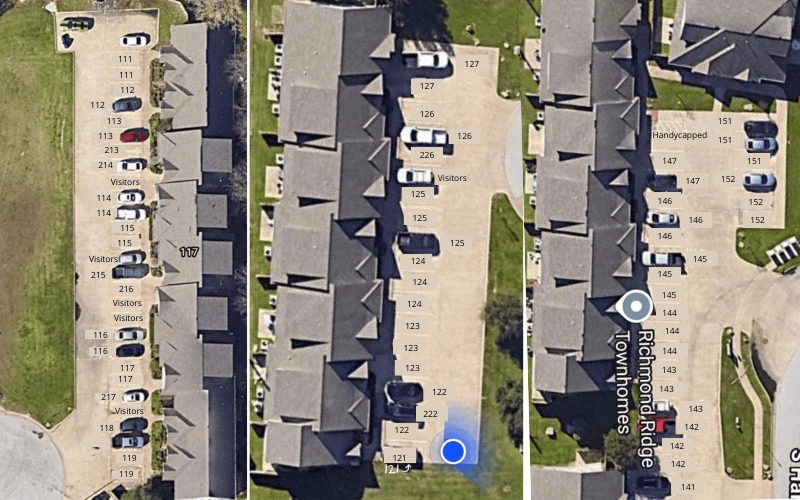
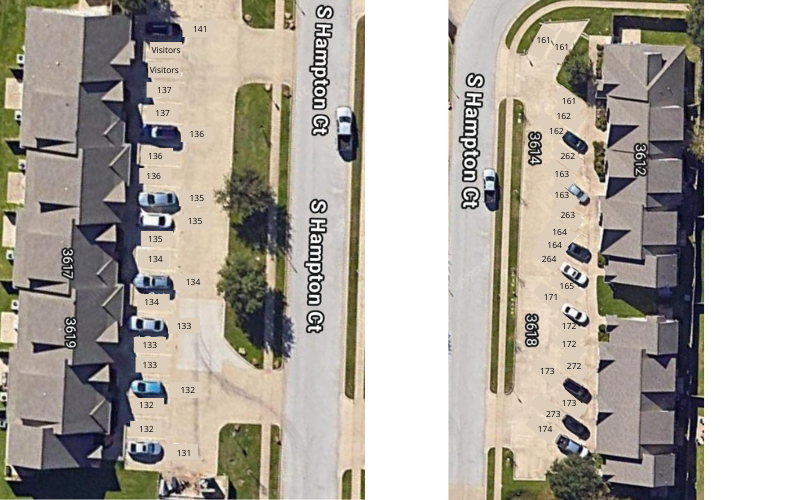
One space is assigned per bedroom as per maps below. Guests and additional vehicles must park in visitor parking or properly zoned street areas.
Thank you for your attention to these items and we look forward to this year!